oci-arm-host-capacity
oraclecloud 프리 티어 계정에서 VM.Standard.A1.Flex 인스턴스 생성
Categories:

container 구성
.env 1
- E2.1 Micro (Always Free)에서 실행하고 생성되는 것을 확인
- 이미지는 AlmaLinux로 설치 후 rockylinux로 마이그레이션됨을 확인
vi /opt/oci-capacity/config/.env
OCI_REGION=ap-seoul-1
OCI_USER_ID=ocid1.user.oc1..a***********************************************************
OCI_TENANCY_ID=ocid1.tenancy.oc1..a***********************************************************
OCI_KEY_FINGERPRINT=7*:**:**:**:**:**:**:**:**:**:**:**:**:**:**:**

# absolute path (including directories) or direct public accessible URL
OCI_PRIVATE_KEY_FILENAME="/opt/oci-arm-host-capacity/dev@oci_api_key.pem"
OCI_SUBNET_ID=ocid1.subnet.oc1.ap-seoul-1.a***********************************************************
OCI_IMAGE_ID=ocid1.image.oc1..a***********************************************************

# Always free ARM: 1,2,3,4. Always free AMD x64: 1
OCI_OCPUS=1

# Always free ARM: 6,12,18,24. NB! Oracle Linux Cloud Developer Image requires minimum 8. Always free AMD x64: 1
OCI_MEMORY_IN_GBS=6

# Or "VM.Standard.E2.1.Micro" for Always free AMD x64
OCI_SHAPE=VM.Standard.A1.Flex
OCI_MAX_INSTANCES=1

# Your public key ~/.ssh/id_rsa.pub contents
# NB! No new lines / line endings allowed! Put inside double quotes
OCI_SSH_PUBLIC_KEY="ssh-ed25519 A******************************************************************* gvp6nx1a-eddsa-key-20230927"

# Is now optional for ARM since Always Free ARMs can be created in any AD.
# ListAvailabilityDomains API call will be used for retrieval https://docs.oracle.com/en-us/iaas/api/#/en/identity/20160918/AvailabilityDomain/ListAvailabilityDomains
#
# NB! Always free AMD x64 instances should be created only in "main" (Always Free Eligible) AD,
# you must set it manually in this case!
#
# If you wanna specify more than one, set as a PHP array in OciConfig constructor (inside index.php file)
OCI_AVAILABILITY_DOMAIN=

# Optional. If not set, default value depends on OCI_IMAGE_ID will be used.
# Minimum is 47 for AMD x64 or 50 for ARM, maximum is 200 for Always Free accounts
OCI_BOOT_VOLUME_SIZE_IN_GBS=50

# Optional. If set, will be used instead OCI_IMAGE_ID. Cannot be used together with OCI_BOOT_VOLUME_SIZE_IN_GBS.
# Open https://cloud.oracle.com/block-storage/boot-volumes, click non-used and copy it's OCID
# NB! You must specify OCI_AVAILABILITY_DOMAIN also as they should be located in the same one
OCI_BOOT_VOLUME_ID=gvp6nx1a

OCI_IN_TRANSIT_ENCRYPTION=false
Dockerfile
vi /opt/oci-capacity/Dockerfile
FROM alpine:3.19
ENV TZ=Asia/Seoul
RUN apk update && \
    apk add --no-cache tzdata \
    php82 \
    php82-curl \
    php82-dom \
    php82-tokenizer \
    php82-xmlwriter \
    php82-xml \
    composer \
    git && \
    ln -sf /usr/share/zoneinfo/$TZ /etc/localtime && \
    echo $TZ > /etc/timezone && \
    cd /opt && \
    git clone https://github.com/hitrov/oci-arm-host-capacity.git && \
    cd /opt/oci-arm-host-capacity && \
    composer install && \
    apk del git && \
    rm /var/cache/apk/*
EXPOSE 80
docker build -t e7hnr8ov/oci-arm-host-capacity:alpine /opt/oci-capacity
host 구성
crond 2
vi ~/.local/bin/oci.sh
#!/bin/bash
# oci arm 인스턴스 생성

source /home/dev/.bashrc
source /home/dev/.local/bin/utils.sh
log_file=/home/dev/.local/log/$(basename "$0" | sed 's/.sh//').log

for (( ; ; )); do
  docker run \
    -i --rm --name=oci-capacity --network=dev --user=0:0 \
    -e TZ=Asia/Seoul \
    -v /opt/oci-capacity/config/dev@oci_api_key.pem:/opt/oci-arm-host-capacity/dev@oci_api_key.pem:ro \
    -v /opt/oci-capacity/config/.env:/opt/oci-arm-host-capacity/.env:ro \
    e7hnr8ov/oci-capacity:alpine \
    php82 /opt/oci-arm-host-capacity/index.php > "$log_file"
  sleep 10
done
oci 콘솔
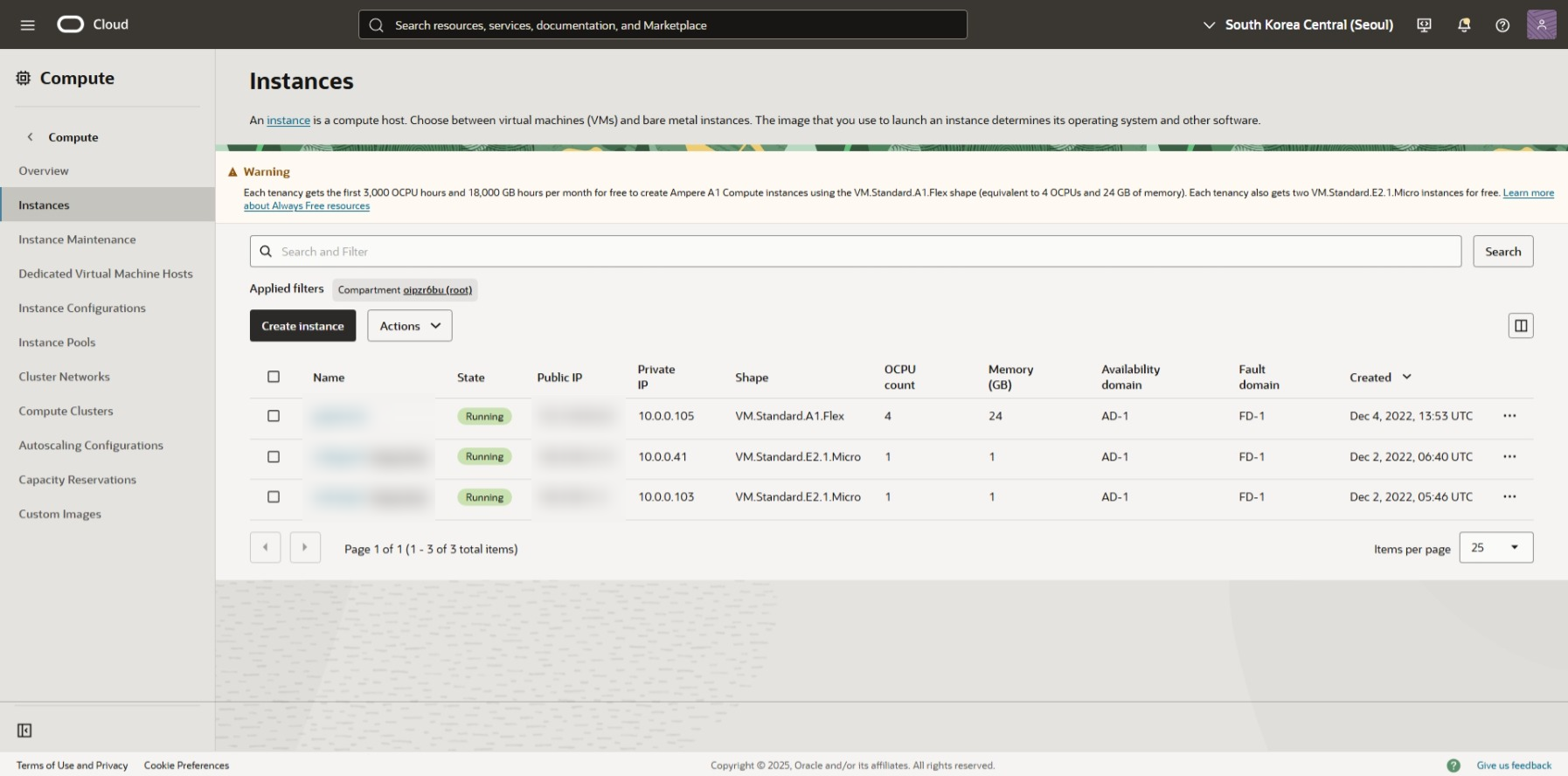
Note
유휴 컴퓨트 인스턴스 회수
유휴 상시 무료 컴퓨트 인스턴스는 Oracle에서 회수할 수 있습니다.
Oracle은 7일 동안 다음이 참인 경우 가상 머신 및 베어 메탈 컴퓨팅 인스턴스를 유휴 상태로 간주합니다.
- 95번째 백분위수의 CPU 사용률은 15% 미만
- 네트워크 사용률은 15% 미만
- 메모리 사용률이 15% 미만 ( A1 셰이프 에만 적용됨 )
Always Free 태그는 없지만 지난 몇 년간 프리 티어 계정에서 잘 작동 중 (2025-12) 3
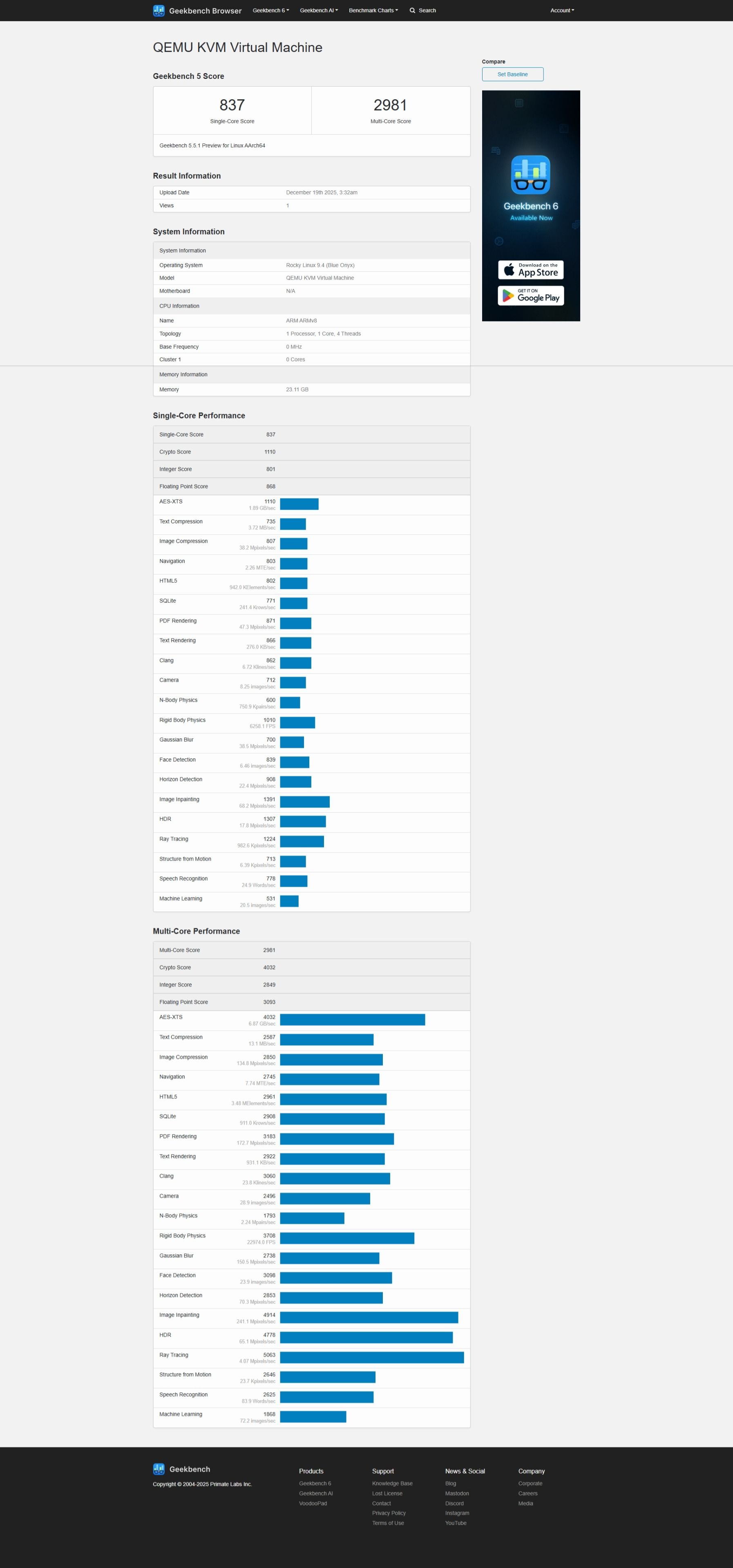
벤치마크
geekbench5 4
yabs.sh
Troubleshooting
ubuntu update 후 부팅 불가 (oraclecloud 자체 패키지와 ubuntu 충돌)
A1 서버 삭제 후 다시 생성해야 함. OS 이미지는 RHEL 권장
“code”: “NotAuthorizedOrNotFound”,
“message”: “Authorization failed or requested resource not found.”
- 콘솔 web-ui에서 vcn 변경 여부 확인
- api 구성에서 .env subnet id 확인